

A few weeks ago, I published my first analytics agents benchmark which tested 14 solutions. It actually got a lot of interest from the data community, and a lot of people reached out asking to add more tools to the benchmark!
So I decided to make it a living thing, and keep it live in this notion:
And this week, I added new updates to the benchmark!
New updates
I benchmarked 7 new solutions:
Cowork + plugins
Codex + MCPs
Clickhouse + Librechat
Count
Fabi.ai
Julius
Thoughtspot
I also could test these solutions with my use case since last time: Metabase, compass
I also added 2 new evaluation dimensions:
Model choice: be able to select the model means you can use the best models out there instead of relying on a black box chosen by the solution.
Skills option in context: skills are becoming huge. They were initiated by Claude Code, and now are available also in Cursor, and Codex - so I expect other AI solutions to take that path too.
Updated results
Here’s where all 21 solutions landed:
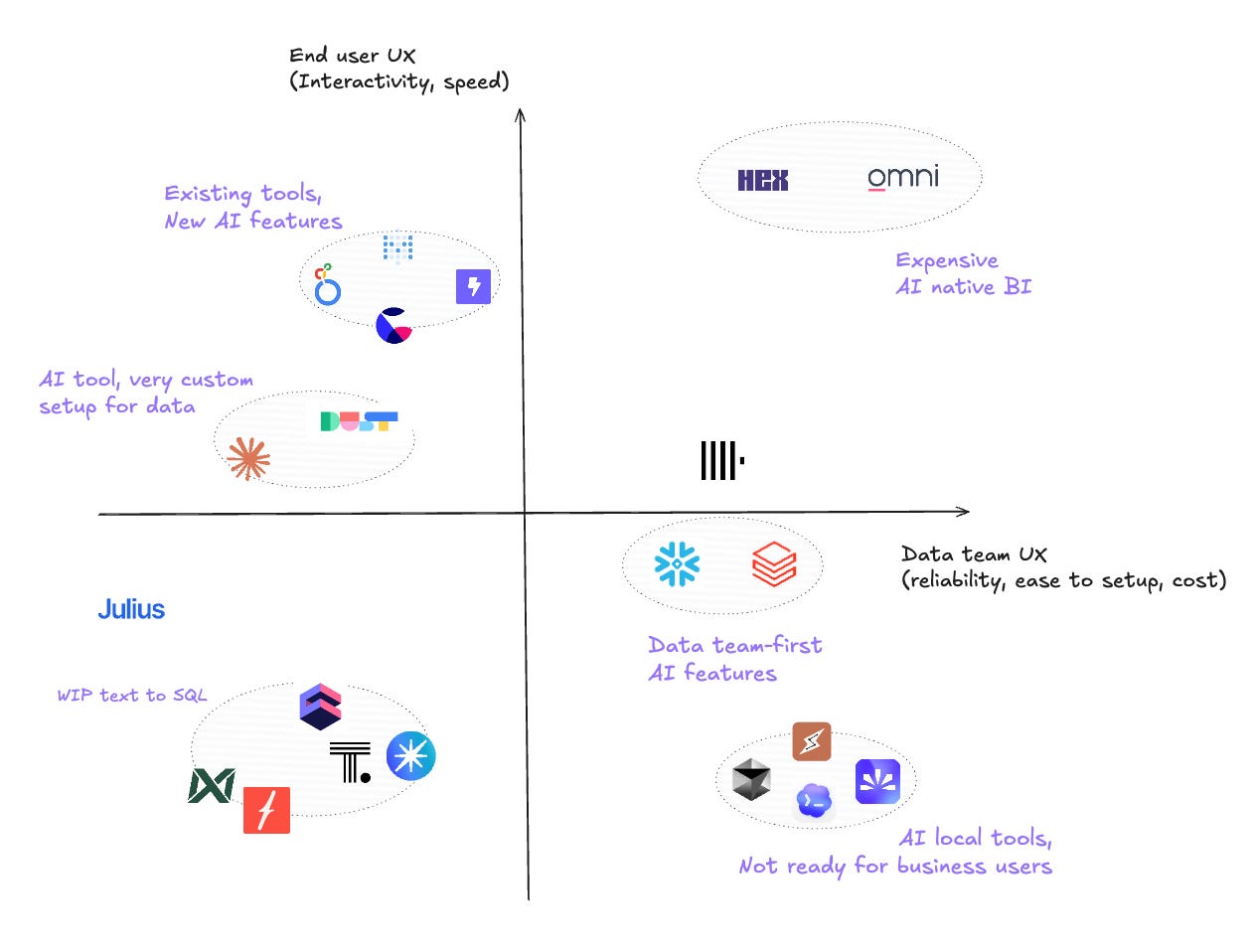
Main scoring
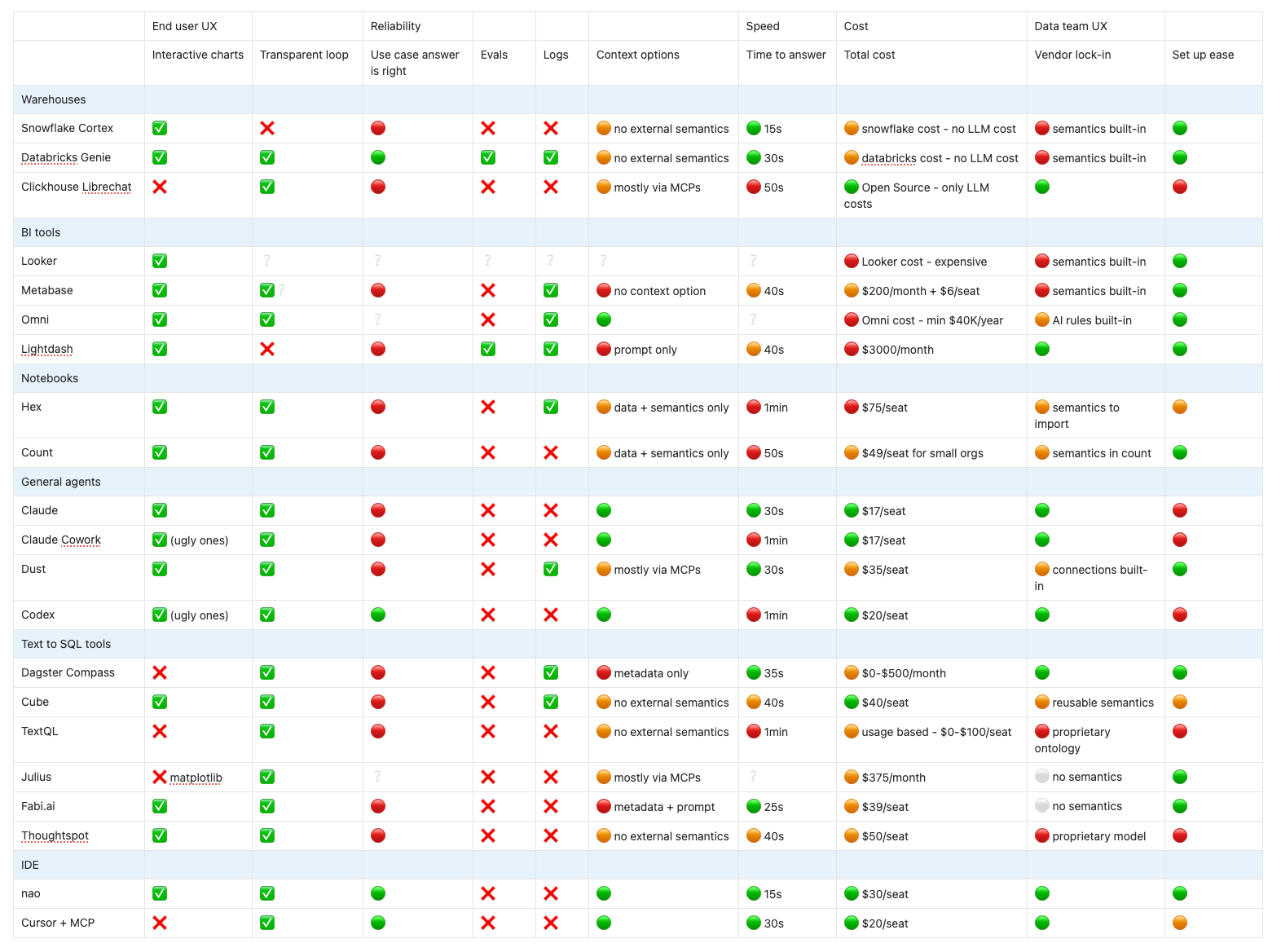
Link to table: View in Notion
Available context by solution
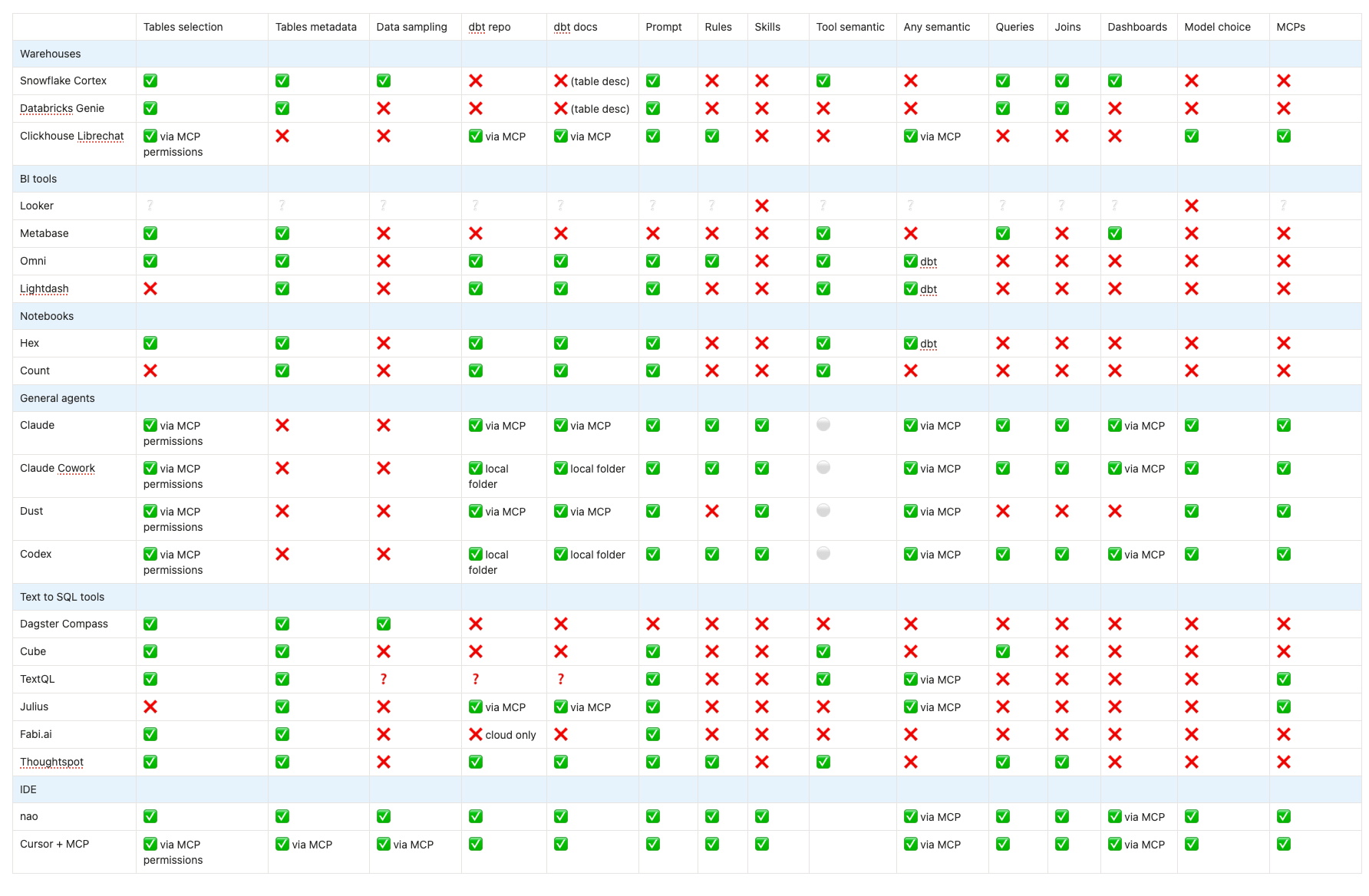
Link to table: View in Notion
Detailed feedback on new solutions
🖱️🪶 Clickhouse + Librechat
This is the only fully Open Source Option of the benchmark.
Here I did the full experience and put my data on Clickhouse - but you could actually use Librechat with other Warehouses since it conntects to the warehouses with MCPs. The setup was a bit painful - because you have to setup MCPs and the dbt MCP was a huge pain to setup. But the UI is very nice looking.
I used it with Opus 4.6 - great thing with this Open Source option: you choose the model you want. So I expected good results but didn’t. The model didn’t call the dbt mcp so it didn’t call my dbt docs and got the definition wrong. Was also pretty long (50s)
Overall, I think this is easy to setup but the fact that the only context is MCPs + rules + manual folders is a bit light. I think it also lacks a panel of monitoring what your users do in it. Maybe this will come soon since Clickhouse acquired Langfuse.
🧮 Count
The setup of count was very easy - free trial, easy data connection, even dbt integration. The context of the agent is quite minimal - you can just add a single prompt. I guess you can also create catalogs but directly within count.
Then, the UI got very un-intuitive. It seems the agent can only access assets that are already in your canvas. I don’t know if I did anything wrong but it couldn’t even search trough my database. Even when adding a query with the right table on the canvas, it did not find info. So my experiment stopped here.
✴️ Claude Cowork + plugins
I tested using Cowork within my dbt repo folder + with their data pluggin + BigQuery MCP + dbt MCP + Opus 4.6 It took quite a long time to answer cause it had to do multiple tool calls to get the schema of the data. It did not use at all the dbt folder so it ended up taking the wrong data. I used the command /analyze which gives step by step instructions on how to analyze - and you can actually personnalize it so could indicate to search for dbt MCP as well. I think it’s really promising!
☁️ Codex
I installed the Codex app, and opened my dbt project in it. It’s pretty cool because it works with a chatGPT subscription - no need to enter LLM keys. I opened my dbt project + added the BigQuery and dbt MCP.
The answer took a bit of time cause it did a lot of data discovery, but eventually it took the right definition and had the right answer! (I could never make the BigQuery MCP work but it worked with dbt MCP)
In the end, codex + 5.3-codex model succeeded to have the right answer - and did better than Opus 4.6! The only issue here is: it worked because I locally had my dbt repo + set up MCPs. So a bit hard to reproduce for business users.
❗️Fabi.ai
Fabi.ai is very easy to setup. You connect your data, and configure the data for AI by selecting tables + adding a system prompt on it. That’s the only context you can give though - or you need to be premium and pay other sources like dbt cloud or Github. Or you need to manually upload files.
In the hand, the model chose the wrong table to answer - but it was blazing fast at it!! It also lacks of a monitoring page to monitor agent perf + user feedbacks.
Since Fabi.ai has so many connectors directly to SaaS, maybe they’re trying to bypass the data team and target companies without data teams that don’t want to / can’t ingest their data in a warehouse.
🧩 Julius
Julius is more focused on chatting with csv data for business users than actual warehouses. You can chat freely with csvs but if you want to chat with a warehouse, you need to pay at least $375/month - no trial possible.
My exploration started quite quickly because of this. Overall, the context options seem a bit limited: your warehouse, MCPs, and some custom prompts to create agents.
The UI is not ideal - python code is execute and you get matplotlib charts. Not my ideal dream of a nice analysis interface.
💭 Thoughtspot
Thoughtspot looks very powerful but also very painful and long to setup - and is full vendor lockin. You can’t even save your data connection if you don’t create a data model on top of it. And modeling means putting all tables in a canvas, creating joins between them, selecting each column. Since every table in a model must be joined, it means you need to do one model for each set of tables. So well, long long work.
In terms of context, it seems promising, but once again a lot to create in the tool. You can import a dbt zip file or connect to dbt cloud. You can reference questions and add business terms to add more context.
So in short, must be powerful but way too much setup and lock-in.
🧭 Dagster Compass
Setting up Compass is quite easy. You connect your tables, accept to add compass to your slack. Then you wait a bit so that compass can scan and profile your tables and here it is.
The issue is that the context you can put is quite light: just metadata + auto data sampling + a system prompt. Since it doesn’t have access to my data / dbt docs, it got the use case wrong. It’s also very limited in terms of interface for business users - just a slack bot with static charts.
A promising feature though is that context is versioned as a git repository. But with new announces of Compass to be directly connected to Ops tools, this tool might be going in a direction to target business people directly instead of data teams.
Ⓜ️ Metabase
Metabot in Metabase is only available Cloud paying versions - though Metabase is known for being a good Open Source, self-hosted option. Set up is quite easy - as long as you have data connected to Metabase, you can chat with it with the agent. But context options are very limited - you select the folder where it can search, but you can’t provide any other context.
In terms of UI, it’s quite fast. And it’s funny to watch the bot create Metabase questions. But it failed to answer my question because it lacked of context - no access to my dbt docs. It also said there was no metric about churn while there at least is a column about churn which it didn’t find. Also, you can only have one conversation at a time - if you start a new conversation, you can’t go back to previous ones.
If you want to make Metabot work, I guess you need to invest a lot in:
Pushing your dbt docs within Metabase schema infos - manual work
Creating Metrics directly in Metabase - vendor lock-in
However, I think it might be interesting for retrieveing existing Metabase queries / dashboards - which I didn’t test.
Final thoughts
In this round of testing, I was once again disappointed by both native AI data analyst tools and traditional BI tools. I think they all either have zero context options or try to trap you into building a lot of context within their tool.
I think LibreChat did a great job creating an open-source, flexible chat UI where you can choose your model, add MCPs, include files as rules, create custom agents. I’ve seen companies like Lodgify build their in-house agent with this open source library. You get an out-of-the-box open source agent UI and focus on context engineering.
But what I really loved was playing with local apps like Codex and Cowork. It’s so cool that they evolve within folders because you can see exactly what’s inside, and they are fast at discovering context. Codex was quite impressive on my use case.
The pattern is becoming clear: the winner will be whoever solves context engineering for analytics. Not who has the best UI or the fastest query time.
I have more tools on my list to test: camelAI, dot, zenlytic, basedash, supersimple, clarityQ, querio, index.
If you’re building an analytics agent or you know of tools I should test, reach out to me on LinkedIn! You can also find more content like this on nao blog!
Love that post: Genuine question, it seems the Evals layer is a blindspot across all of those solutions. What would be one way to fill that gap?