
I battletested 5 open source analytics agents
LangChain, Wren AI, nao, LibreChat, and Vercel's knowledge agent. Tested on the same BigQuery table, with the same model, and the same query.


When it comes to analytics agents, most data teams I see want to build, not buy.
They want to own the stack, run it on their own infrastructure, and keep full control of the context that drives it. So the real question isn’t “which agent should we buy?” but “which open-source framework should we build on?”
To answer it, I picked five projects that cover the range of what’s actually out there today: LangChain, Wren AI, nao, LibreChat, and Vercel’s knowledge-agent-template. From the outside, they look interchangeable, but they’re really different. Three of them are tools you’d actually use to answer a data question. Two of them are not. And inside the three that are, the differences are bigger than any side-by-side comparison makes them look.
So last weekend I decided to give each one a real test. Same BigQuery table, same model, same question, 3 runs each. Here’s what I found.
Five projects, five different categories
Most people get this part wrong. These 5 projects all show up in “open-source AI agent” lists, but they’re not the same kind of tool at all.
LangChain is an LLM agent library. It gives you the building blocks, and you write the agent. Its context is whatever you put into the prompt.
Wren AI is a semantic context engine. You define your tables and metrics in a specific modeling language called MDL. And you bring your own coding agent (Codex, Claude Code, Cursor…) to query it.
nao is a full analytics agent. File-system context layer, chat UI, MCP server and MCP App, evaluation framework, all built in.
LibreChat is a self-hosted chat UI for LLMs. Out of the box, it talks to OpenAI, Anthropic, etc. No database tools.
Vercel’s knowledge-agent-template is a Nuxt template for building file-system search agents.
grep,find,catacross configured sources (GitHub repos, YouTube transcripts, custom APIs).
My evaluation framework
Because these tools live in different categories, "did it get the answer right?" on a single question isn't enough. A library that requires you to write the agent yourself will fail any one-shot accuracy test by definition, and that doesn't mean it's a bad library. So I scored each one on the dimensions that actually matter when you're picking a framework to build your analytics agent on:
Setup time. From
pip install(orgit clone) to a working chat with your warehouse: how long?Warehouse connection. Built-in connector, or do you wire BigQuery in yourself?
Tools. Are SQL, schema, charts available out of the box, or do you build them?
Context layer. Where does business meaning live? In the prompt, a modeling language, markdown files, or nowhere?
Agent UI. Does it ship a chat interface, or do you build one?
Accuracy on a real question. Same BigQuery table, same model, same question, 3 runs each. Right or wrong.
Maintainability over time. What does adding the 25th table look like? What does an analyst do when the agent gives a wrong answer once your team is using it daily?
For the accuracy test, I picked one question:
“What was the churn rate last month?”
It sounds trivial but it’s not: churn rate needs a self-join (this month’s churned licenses over the previous month’s paying licenses), and an LLM left alone will use the current month as the denominator and end up a couple of percentage points off.
The data is our Stripe MRR table (prod_silver.fct_stripe_mrr). I graded each run against the real number computed directly from the warehouse, which I’m not sharing. Right or wrong is what matter :)
Comparison
1 - LangChain
LangChain is a Python library for building LLM applications. There’s no agent out of the box. You assemble one from primitives: a chat model, custom tools, a system prompt, a create_agent call.
How to set up the agent, tools and warehouse
The official SQL quickstart walks you through it. Two install steps:
pip install langchain langgraph
pip install -U “langchain[openai]”
Then in Python, you initialize the chat model, define your tools with @tool decorators (one for listing tables, one for getting schema, one for running queries, one for checking SQL), write a system prompt, and wire it all together:
from langchain.chat_models import init_chat_model
from langchain.tools import tool
from langchain.agents import create_agent

model = init_chat_model("gpt-4o")

@tool
def sql_db_query(query: str) -> str:
    """Execute a SQL query."""
    # ... your BigQuery client logic

# ... three more tools: list_tables, schema, query_checker

agent = create_agent(model, tools, system_prompt="...")
About 30 minutes if you've done it before. And you have to add another step to wire BigQuery in, because there's no built-in connector.
How to set up context
There is no context layer. The agent introspects the schema live via INFORMATION_SCHEMA every time, and the LLM has to figure out semantics on its own. Want it to know what “last month” means? Stuff it into the system prompt. Same for the self-join, and same for every domain concept your analysts will ever ask about.
Agent UI
No chat UI either. You vibe-code one on top: a frontend, Slack integration, auth, history. All custom work, you decide what you do.
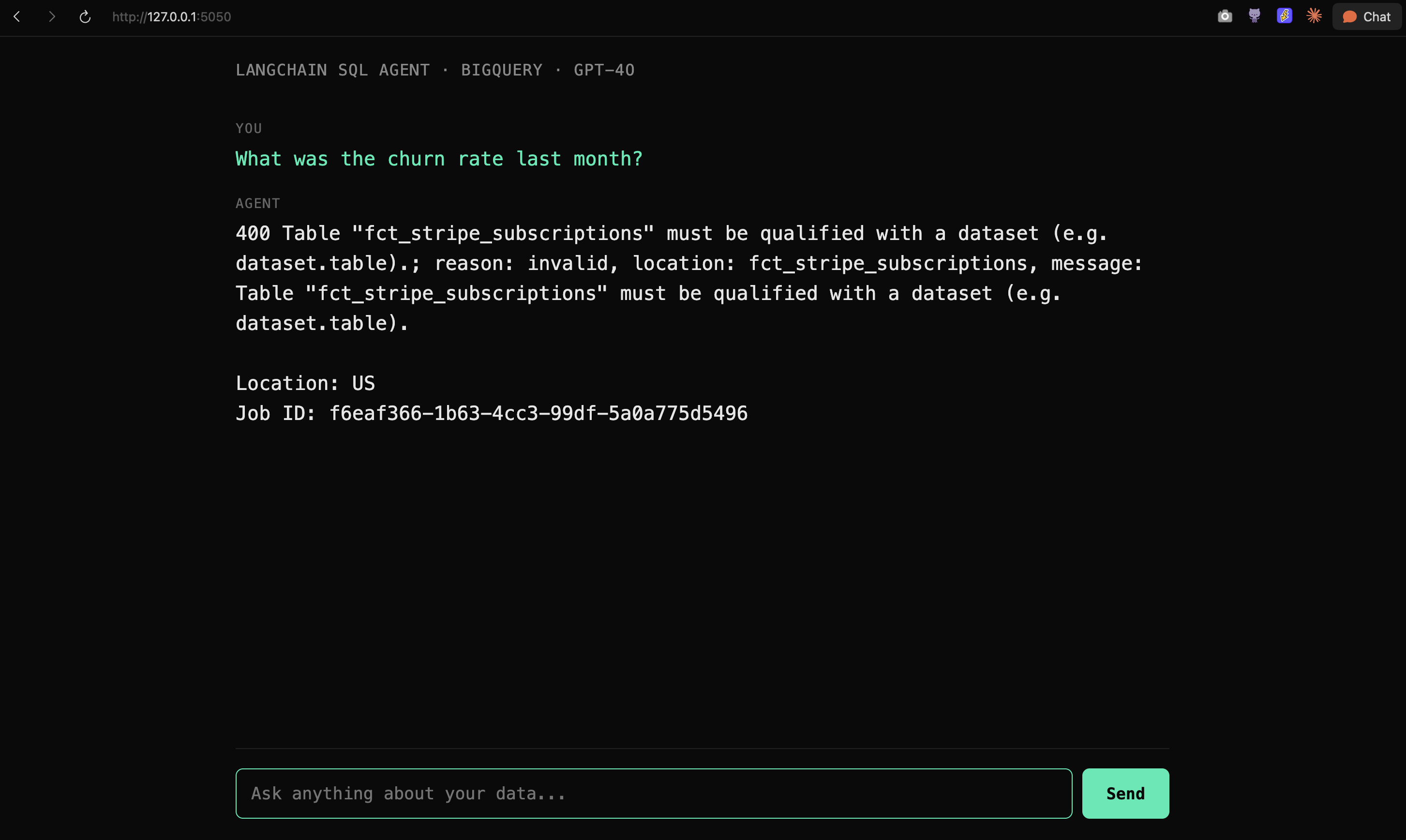
Here’s the simple one I generated in a minute.
Results
1 run out of 3 finished. The one that finished returned the wrong number, it used MAX(month) to find “last month,” landed on a future-data row, and skipped the self-join entirely. The other two hit the agent recursion limit re-validating malformed SQL.
The LangChain SQL agent is not broken. It’s doing exactly what the library promises: hand the LLM a schema and let it figure things out. The problem is that an LLM without context doesn’t know what your business actually means. And LangChain doesn’t ship any context natively.
Where it fits
LangChain absolutely can work, and plenty of teams have built great analytics agents on top of it. The catch is that you have to bring the missing pieces yourself: a real context layer (a curated markdown folder, a prompt library, a custom retrieval system), or a semantic layer like Wren AI plugged in underneath.
So if you're a developer building a product, comfortable owning the context, evaluation, and UI yourself, LangChain is a strong foundation. If you're a data team that just wants to answer questions reliably, you'll want one of those layers already wired up before you start.
2 - Wren AI
Wren is different. It’s a semantic context engine, not an agent.
How to set up the agent, tools and warehouse
Three commands to install and connect:
pip install "wren-engine[bigquery,main]"
npx skills add Canner/wren-engine --skill '*'
wren profile add nao-bq --ui
That last command opens a local web form in your browser where you punch in your BigQuery project, dataset, and credentials. Hit save and Wren writes the connection profile to disk. No yaml to hand-write.
mkdir ~/nao-wren && cd ~/nao-wren
wren context init
Agent UI
There’s no UI. You open a coding agent instead: Claude Code, Cursor, Codex, Windsurf, Cline, whichever you have installed. The Wren skills are not Claude-specific; they work in anything that supports the skills format.
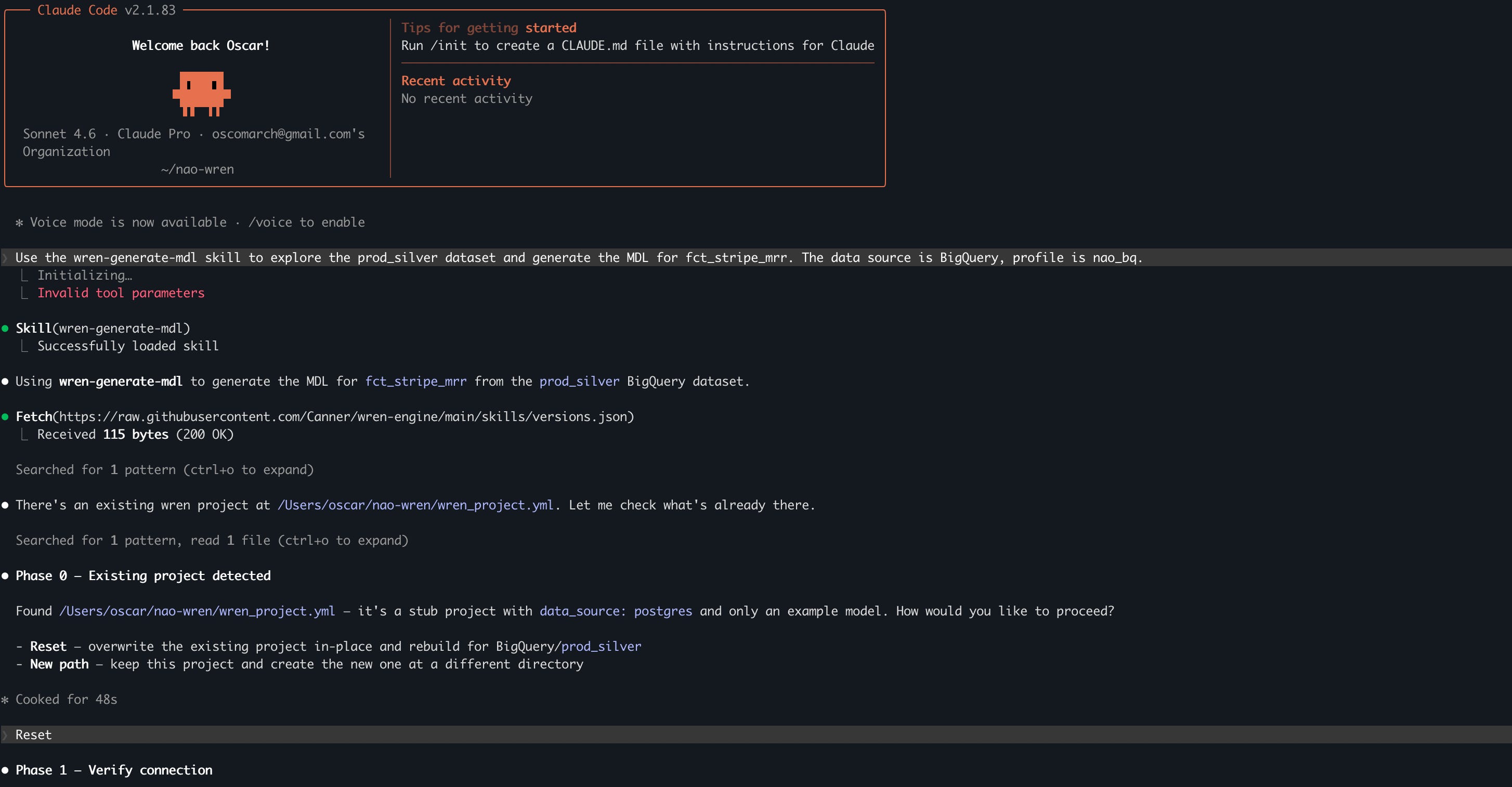
From inside the project, you ask your coding agent to generate the semantic layer:
Use the wren-generate-mdl skill to explore the prod_silver dataset
and generate the MDL for fct_stripe_mrr. The data source is BigQuery.
The skill explores your dataset, writes the MDL files into models/<ModelName>/metadata.yml, validates them, builds context, and indexes memory. From there you ask questions in natural language. The wren-usage skill writes the SQL against your model names and runs it through the Wren engine.
The whole setup takes about 20 minutes, but only if you already have a coding agent installed.
Results
I then asked the question directly in the coding agent interface.
3 out of 3 runs correct. Same answer every time, via the same self-join. Worked beautifully.
One thing to flag: Wren expects you to drive it through a coding agent. The skills do the heavy lifting (writing the modeling files, querying the engine, handling SQL dialect quirks). If you skip the coding agent and call Wren from your own LLM application, you’re recreating that work yourself.
Where it fits
Wren fits if two things are true for you.
First: you’re OK with your context living in a proprietary modeling language. MDL files are Wren-specific, they’re not markdown, they’re not dbt YAML… When the agent gives a wrong answer, the fix goes through the semantic model.
Second: you want a coding agent to be your main query interface. Wren doesn’t have a chat UI. It’s designed to be driven by Claude Code, Cursor, Codex, Windsurf, Cline, or whatever coding agent your team is already using. If your analysts are comfortable opening a coding agent and typing natural language questions there, the experience is smooth.
3 - nao
nao is an open-source analytics agent with a file-system context layer, a chat UI, an MCP server + MCP app, and a built-in evaluation framework.
How to set up the agent
The setup is only two commands:
pip install nao-core
nao init
nao init is interactive. It walks you through everything in your terminal:
🚀 nao project initialization

? Enter your project name: my-analytics-agent
? Set up database connections? Yes
? Select database type: Bigquery
? Connection name: bigquery-prod
? GCP Project ID: nao-production
? Default dataset (optional): prod_silver
? Authentication method: Service account JSON file path
? Path to service account JSON file: /path/to/bq-key.json
? Set up LLM configuration? Yes
? Select LLM provider: OpenAI
? Enter your OPENAI API key: ********

✓ Created project my-analytics-agent
✓ Saved my-analytics-agent/nao_config.yaml

🔍 nao debug - Testing connections...
✓ bigquery-prod (24 tables found)
✓ openai (126 models available)
No yaml to write upfront. You answer prompts, nao writes the config for you, then immediately runs nao debug to verify the connection works. About 3 minutes.
How to set up context
Only one quick command:
cd my-analytics-agent
nao sync
nao sync pulls every table from your warehouse and writes the context as markdown files into your project. Four files per table: columns, preview rows, “how to use” notes generated from query history, and profiling stats.
databases/
  type=bigquery/
    database=nao-production/
      schema=prod_silver/
        table=fct_stripe_mrr/
          columns.md       # column list with types
          preview.md       # sample rows
          how_to_use.md    # LLM-generated usage notes
          profiling.md     # null counts, distinct values, top values
        table=fct_users/
          ...
        ... (24 tables)
I had 24 tables, so it generated 96 markdown files. All sitting in a git repo. All editable by anyone on the team who can read English.
That’s the differentiator. Context lives as markdown files in your file system. When you ask "what was churn last month," the agent fetches the relevant columns.md, preview.md, and how_to_use.md. It sees actual column descriptions, example rows, and usage notes. Not a guess.
The best thing is that if you want the agent smarter for next time: you just open how_to_use.md and add two sentences in English. No semantic layer, no re-indexing, etc..
Agent UI
Just run nao chat.
That launches a chat UI on port 5005 with conversation history, chart rendering, and SQL preview built in:
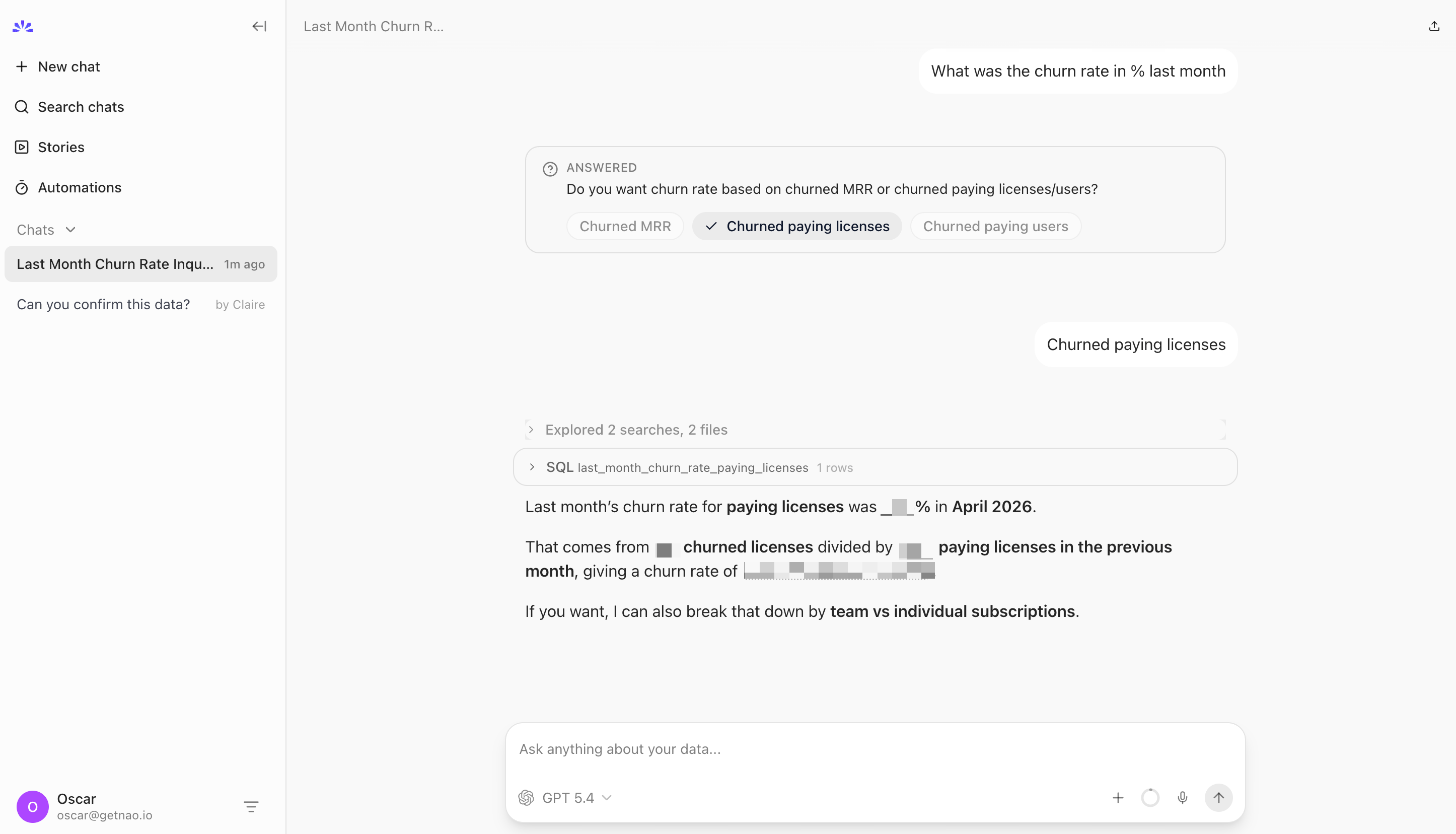
There's an MCP server too if you want to plug the agent into Claude Code, Cursor, or Slack. nao also ships its own skills - reusable markdown procedures the agent uses to build context for new tables, run evaluations, write dbt models. The skill format isn't Claude-specific; it works in the nao chat UI, the MCP interface, or any coding agent.
Results
3 out of 3 correct. Right denominator (paying licenses from the previous month, not the current month). It volunteered both license churn and MRR churn without being asked, because both are useful answers to “what was the churn rate.”
Where it fits
nao is the right pick if you want to be up and running quickly, without having to build a semantic layer first, and regardless of what the rest of your stack looks like. The warehouse connection, context generation, and chat UI are all wired up from the first two commands. There’s no modeling language to learn, no platform to integrate before you can ask a question.
The context lives as markdown in your repo, so anyone on the team can edit it. New table? nao sync. New metric definition? Open how_to_use.md and write a sentence. New analyst joining the team? They already understand markdown. Context engineering stops being an engineering project and starts being a team practice.
4 - LibreChat
LibreChat is here because it represents a real pattern a lot of data teams end up considering: take a self-hosted chat UI, wire in a database tool via MCP, and call it an analytics agent. It's worth testing because the architecture sounds reasonable. Let's see what happens when you actually run it.
How to set up the agent
The official path is Docker:
git clone https://github.com/danny-avila/LibreChat.git
cd LibreChat
cp .env.example .env   # add your OpenAI/Anthropic key
docker compose up -d
Open localhost:3080, register the first user, and you have a private ChatGPT for your team. Multi-model support (OpenAI, Anthropic, Google), conversation history, RAG over uploaded files, agent assignments. Beautiful out of the box.
How to set up context, tools and warehouse
LibreChat has no database tools natively. You add them via MCP. The config lives in `librechat.yaml`, which you mount into the container:
mcpServers:
  bigquery:
    type: stdio
    command: npx
    args:
      - -y
      - "@ergut/mcp-bigquery-server"
      - "--project-id"
      - "your-gcp-project"
      - "--key-file"
      - "/app/gcloud-credentials.json"
Restart, and the BigQuery tool shows up in the chat dropdown.
Agent UI
Results
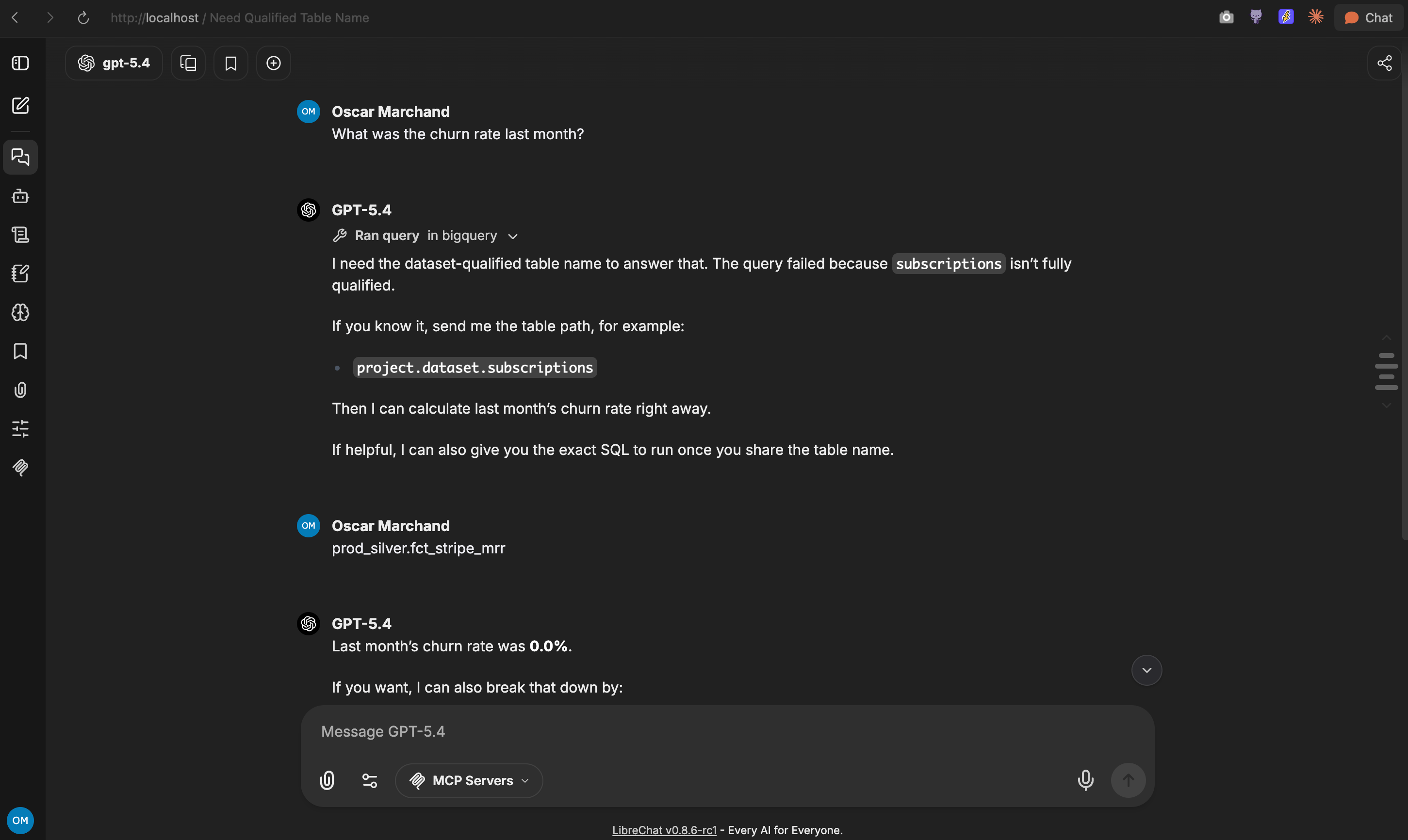
I asked: “What was the churn rate last month?”
First, the query failed. The MCP server has no idea your tables live in prod_silver, it needed me to hand it the fully qualified table path before it could do anything.
Once I did, it came back with: “Last month’s churn rate was 0.0%.” Confidently. With an offer to break it down by customer count churn, MRR churn, voluntary vs involuntary.
The real number is not 0.0%.
Same failure mode as LangChain: a thin SQL executor gives the model a way to run queries, but no context about what your data means. No schema awareness, no self-join hint. It guessed. It got it wrong.
Then I swapped in nao’s MCP, two lines in librechat.yaml, with nao already connected to our BigQuery with full context synced:
mcpServers:
  nao:
    type: streamable-http
    url: https://<your-nao-instance>/mcp
    headers:
      Authorization: "Bearer <your-nao-token>"
I asked the same question. And it got the right answer, first try.
But that’s the point: LibreChat is the chat client. The MCP server is the agent. It was nao doing the analytics work, not LibreChat. The answer quality is entirely determined by which MCP you wire in.
Where it fits
LibreChat is the right pick if you want a self-hosted ChatGPT for your team with auth, multi-model, and conversation history, and you’re ready to pick the right MCP server to back it. The UI is really good. Just don’t assume that plugging in a SQL MCP gives you an analytics agent. It gives you a chat UI with a SQL tool. Whether that’s enough depends entirely on what’s behind the MCP.
5 - Vercel’s knowledge-agent-template
This is the one I was most curious about, because the README sounded great: "Open source file-system and knowledge based agent template. Grep, find, and cat across your sources."
How to set up the agent
git clone https://github.com/vercel-labs/knowledge-agent-template.git
cd knowledge-agent-template
cp apps/app/.env.example apps/app/.env   # set BETTER_AUTH_SECRET + GitHub OAuth
bun install
bun run dev
Open localhost:3000, register, you have a chat app. So far so good.
What’s actually in the toolbox
I went looking for the SQL tools. Here's what's actually in the agent's tool packages:
packages/sdk/src/tools/
  shell.ts              # createBashTool, createBashBatchTool
packages/agent/src/tools/
  web-search.ts
  web-search.perplexity.ts
That’s it. No database connector. No SQL tool. No way to point this thing at BigQuery and have it run a query.
The “grep, find, cat” in the README refers to runtime sandbox tools the agent uses against configured knowledge sources: GitHub repos, YouTube transcripts, custom API outputs cached as files. To actually use it for agentic analytics, you’d need to write a custom source connector (or a custom tool against the SDK). That’s real engineering work, and at the end of it you’ve built an analytics agent on top of a file-system agent template.
Results
I asked the question with default sources anyway. The reply was a polite version of “I don’t have access to your BigQuery. I can search configured knowledge sources (GitHub repos, docs, etc.).”
At least that’s a honest answer.
Can you connect an MCP server to it to make it work?
In theory, yes. The Vercel AI SDK v6 ships experimental_createMCPClient. But the template has zero MCP wiring, no client instantiation, no tool registration, nothing in base.ts or anywhere else. You'd need to add it yourself. That's real code to write, and you'd be grafting analytics capabilities onto a file-system search template that wasn't built for it.
Where it fits
This is a perfectly designed file-system search agent. If you want an agent over your codebase, a knowledge base of markdown files, or YouTube transcripts, it's exactly what you'd want. It's just not a data warehouse agent. For agentic analytics, it's the wrong category, and you can tell because there's no SQL tool anywhere in the package, and no MCP client either.
Comparison summary
Here's how they stack up across the dimensions that actually matter.
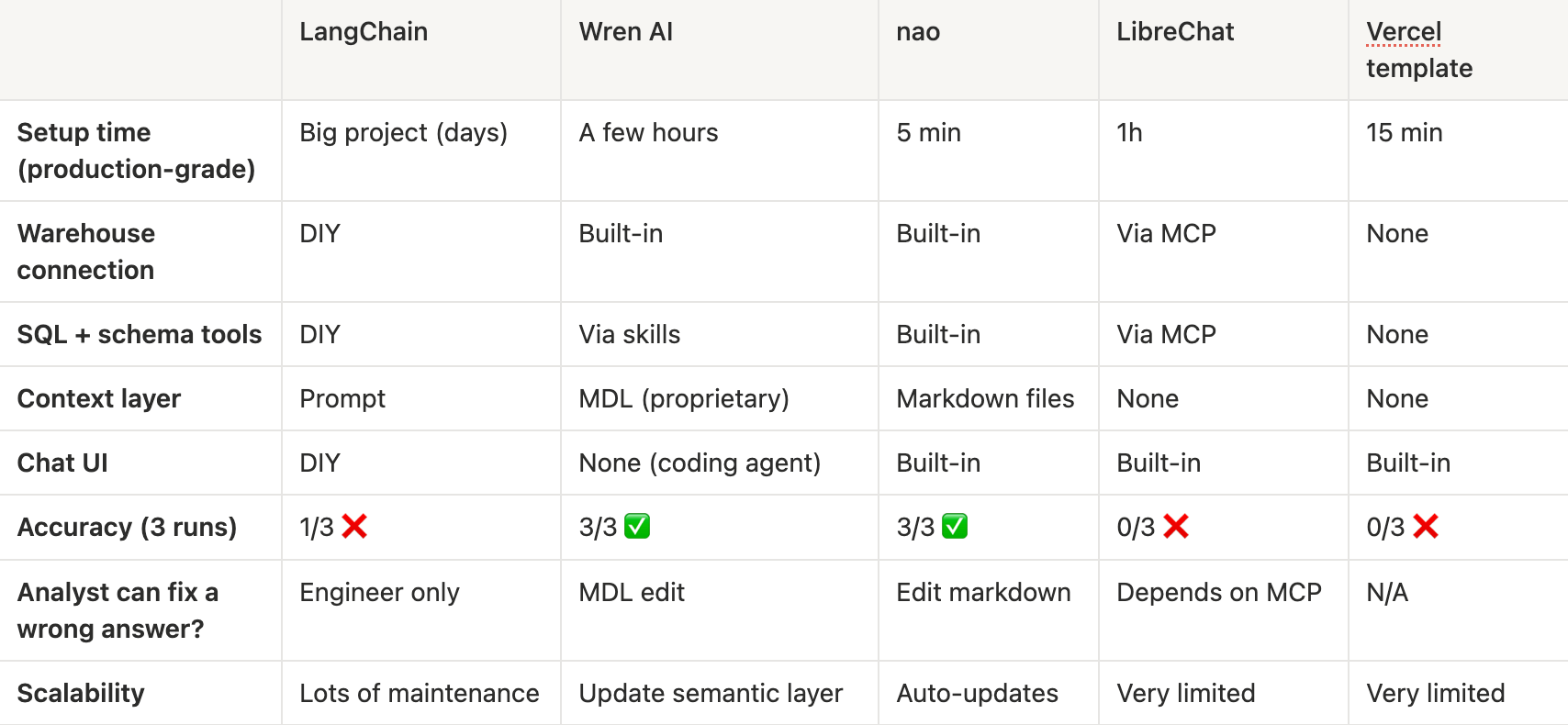
Where does your context live? Is the real question.
I started this test with a simple question: which open-source framework should a data team build on?
Halfway through, I realised that’s still the wrong frame. Two of the five (LibreChat and the Vercel template) aren’t analytics tools at all. They show up in the same lists because they’re all open-source projects with “AI agent” in the description. None of them are the same tool.
That leaves the three that can actually answer a data question: LangChain, Wren AI, and nao. And the real difference between them isn't features or accuracy. It's where they store the context that makes an agent useful.
LangChain bets context lives in the prompt. You construct it per question, per app. The framework gives you the loop.
Wren AI bets context lives in a semantic model. You define your business meaning in MDL, and a coding agent queries against it.
nao bets context lives in your file system. Markdown files in a git repo. Editable by humans, readable by LLMs, composable with everything else you already maintain (dbt docs, business glossaries, rules files).
These bets have totally different implications for who can edit context, how you version it, and whether an analyst can fix a wrong answer without going through an engineer.
Our bet at nao is that the file-system shape wins. It's the same shape AI coding agents (Claude Code, Cursor) already use to understand a codebase: read the files. nao applies the same shape to data context.
More
If you want the deeper version with the full comparison table and the long-run maintenance dimensions (scaling context, observability, feedback loops), I wrote it up on the nao blog: LangChain vs Wren AI vs nao.
What I’m curious about: where does your team’s context live today? In Notion docs nobody reads? In a dbt YAML? In someone’s head?
Drop a comment - we’re trying to figure out if “context as markdown files in your repo” is as obvious to other data teams as it’s become to us at nao :)
Hi,
Love your content on LLMs! I'm Sia from Novita AI—we help developers access and deploy LLMs instantly, without the hassle of managing infrastructure themselves.
We're currently building our creator network through an affiliate program. Your followers are exactly the kind of developers and builders who benefit from our service, and I think this could be a valuable opportunity for you.
Happy to share details if you're interested.
Best,
Sia