
First context engineering study - are semantic layers worth it?
I ran 30 context experiments to understand which piece of context has the most impact on analytics agents performance

Everyone has an opinion about what makes analytics agents work. “Semantic layers are the answer”. “Ontology is the key”. “Add data sampling”. “Build sub-agents”.
These are opinions, not facts.
And why would this answer be a one-size-fits-all? Should a one-person data team with 10 core tables put as much effort in building their context as a 100-person data teams with 150 datasets in 10 domains?
That’s why a core block of nao open-source analytics agent is an evaluation framework. We want every data team to be able to measure the performance of their AI agent, and choose which context makes the most sense for them.
I wanted to have some first answers myself, so I took nao internal data and ran many context experiments to understand which context is the most efficient on our data model.
I measured several KPIs for each context setup: reliability, costs, speed. And I tried to answer these 3 questions first:
MCP vs. file system context: which one is the most efficient?
Metadata, sampling, profiling, dbt, rules: which piece of context brings the most reliability to the agent?
Semantic layers: what’s the real impact?
⚠️ Important disclaimer: These are first tests, run on our internal data, our specific setup, our specific silver layer. The results may not generalize to your data, your schema, or your use case. The whole point of sharing this is to encourage you to run your own tests - and share them!
🧫 Setting up my test cases
First, I created a set of 40 text-to-SQL unit tests covering the 12 tables in our silver layer.
Each test is: a natural language question + the SQL to the expected answer. Here’s an example:
name: signups_weekly
prompt: How many signups did we have per week in the last 4 weeks?
sql: |
    select
        week,
        sum(n_new_users) as n_signups
    from nao-production.prod_silver.fct_users_activity_weekly
    where week >= date_trunc(current_date - interval 4 week, isoweek)
    and week < date_trunc(current_date, isoweek)
    group by week
    order by week
The 40 tests span various types of questions: KPI lookups, usage analytics, error analytics, cohort analysis, distribution analysis. Some are simple single-table selects. Some require multi-step CTE nesting.
I wanted to reproduce something realistic - where business teams retrieve KPIs but also try to understand day to day user events and product usage.
🧪 How nao evaluation framework works
nao evaluation framework runs your agent against a set of unit tests and measures performance on several KPIs.
Here’s the process:
Define your tests: question + expected SQL pairs in YAML
Configure your agent context: with nao sync + nao context file system, put the files you want + MCPs you want in your agent context
Run the evaluation: the agent is given the test cases question and outputs data in a structured way
Compare results: we compare expected SQL outputs with the agent output and run an exact data diff on it
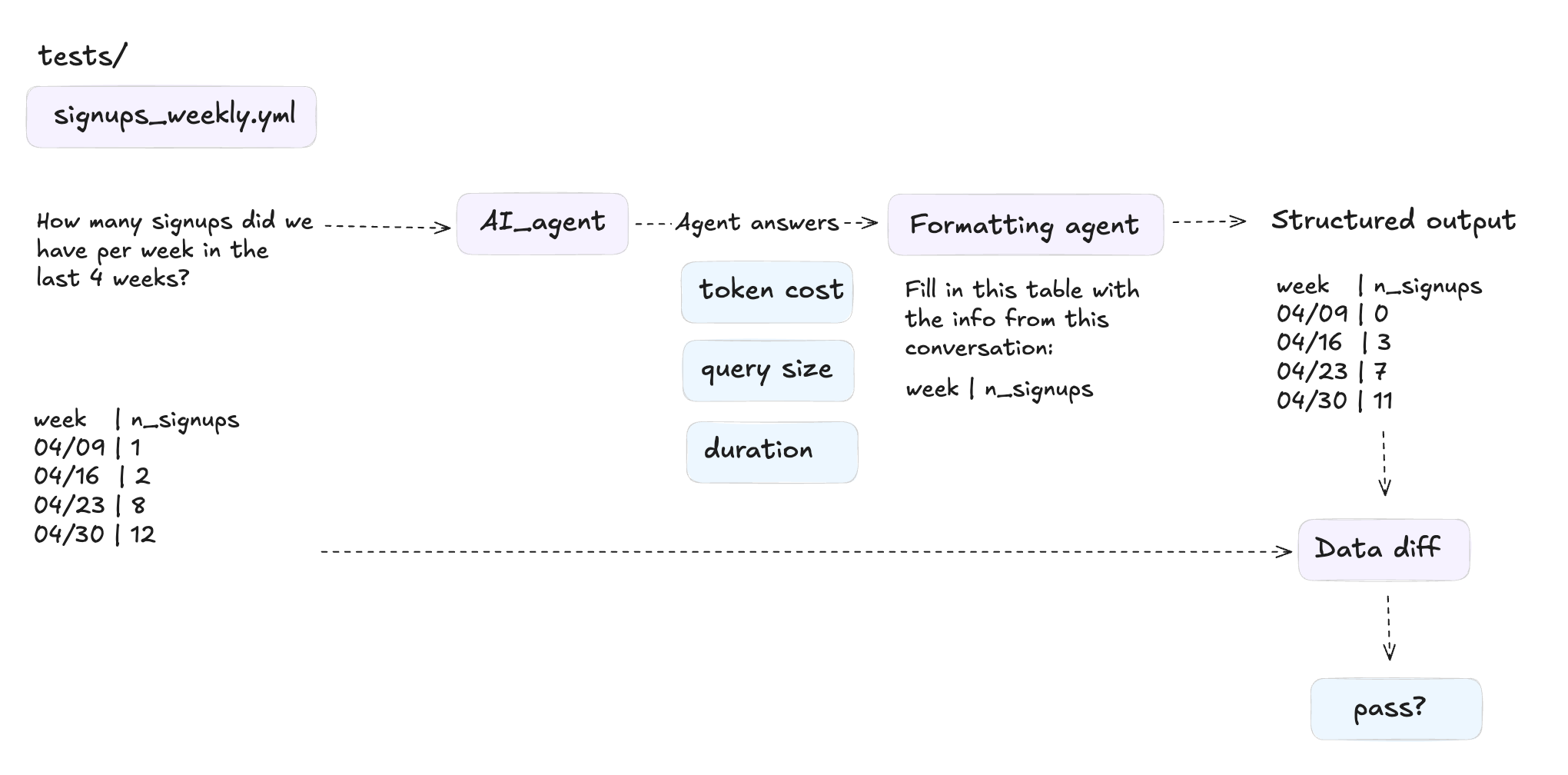
If you want more info on how we get a structured data output from the agent without biasing it, you can check our docs here. I’ll come back to it later in a next article!
For each test, we compute:
Coverage: % of questions where the agent returns an answer
Reliability: % of questions where the agent returns the correct answer
Cost: total token cost to answer all the questions
Time: total time to answer all questions
Data scanned: volume of data the agent queries (here using BigQuery dry run)
I also computed other sub-kpis for explainability: number of tools called, tool call error rate.
📚 Contexts Created
For this study, I didn’t want to manually curate too much context. I used what was already available and what I could generate with AI:
Already available (no extra work):
12 silver tables
My dbt repository
A single
silver.ymlwith AI-generated dbt docs (one mega file)
Generated with AI:
One mega
RULES.md: a structured summary of my dbt repo + data schema + main metrics + business definitions. I made sure there was no answer leakage in it - ie no SQL or written solutionA MetricFlow semantic layer definition for the 12 silver tables with main dimensions and metrics
This is important: I’m testing what you’d realistically have in the first days of setting up an analytics agent. No hand-tuned prompts. No weeks of curation. Just what you can get quickly.
🏃🏻♀️ Running 30 experiments
These are the 10 context experiments I tried:
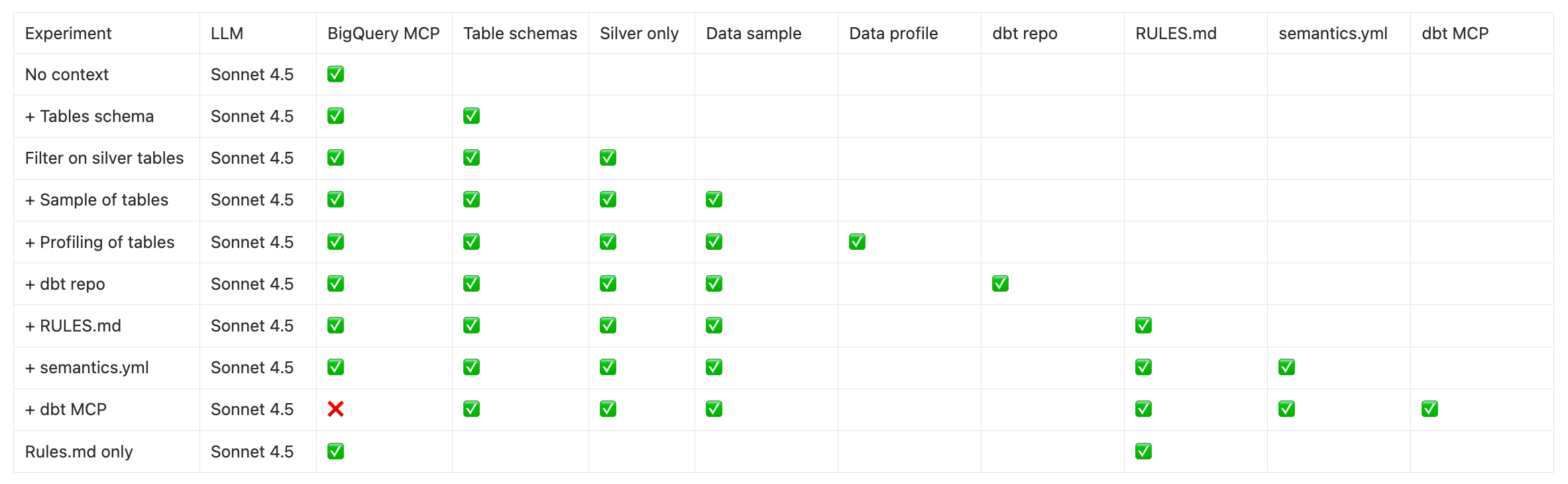
To take into account model randomness, I ran every test 3 times. So that’s 30 runs.
💎 Experiments results
🛠️⚡️📂 Test 1: MCP vs File System context
The first question is meant to reproduce 2 different setups:
Agents + MCPs: the one we can all do. Installing the BigQuery MCP in Claude to chat with our data, no extra context.
File system: the one that reproduces what Cursor / Claude Code / Cowork do: context is in the file system and the agent searches for context within it. I just add an execute_sql tool for it to query the data.
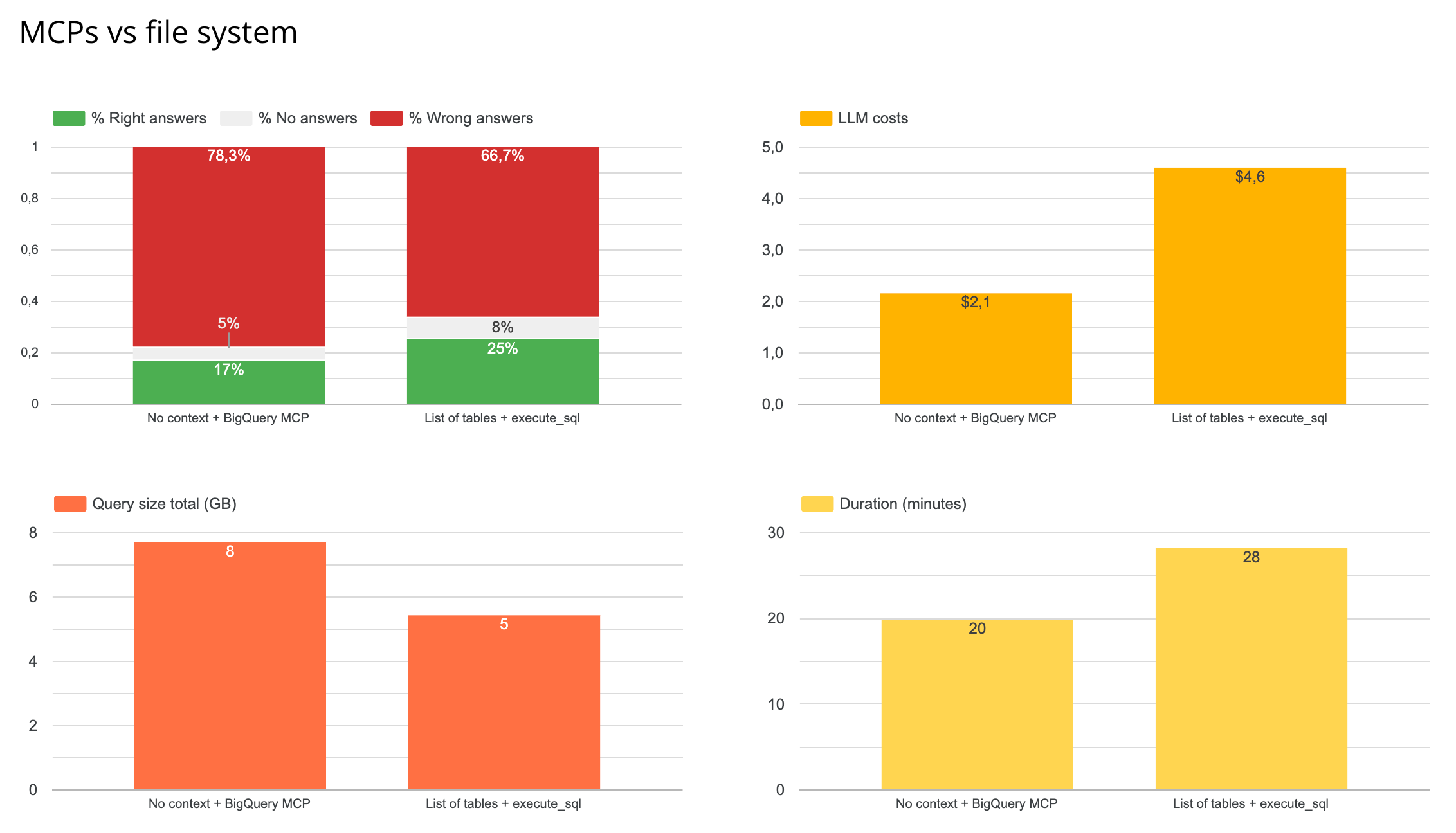
Results
The file system wins in terms of reliability - though not by much.
It’s 2x more costly in tokens because it’s fed with more context pieces
It’s less costly in querying since it already has data context and doesn’t need to query to discover the data
In the end, the file system with a simple context is already a better solution than the simple agent + MCPs. Next step in my research is to improve even more this file system context performance - because 25% reliability is pretty low.
🧩 Test 2: Which context piece matters most?
Here I tested what had the most impact on my agent among: metadata, data sampling, data profiling, dbt repo, rules. Also tested the impact of feeding all your tables to the agent vs restricting it to your most clean layer (silver here)
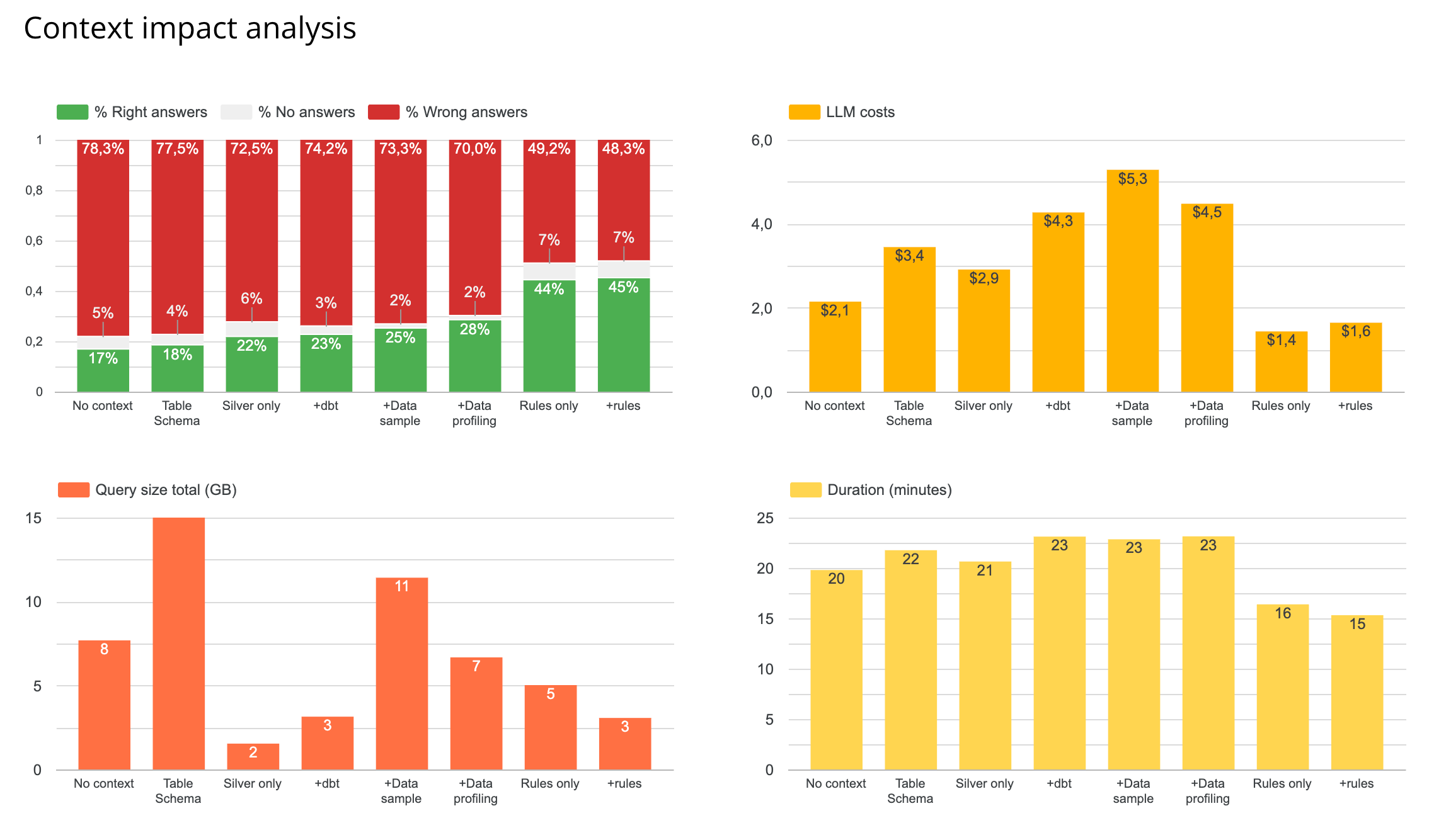
Results
🏆 Best setup = data schema + sample + a rules.md
Rules.md added the best performance: higher reliability, lower LLM + querying costs, faster answer. A single well-structured markdown file that describes your tables, their relationships, and key metric definitions outperforms everything else I tested.
Profiling vs sampling of data: profiling of data performed better than sampling, in terms of both reliability, costs, and query sizes. But when testing both profiling + sampling with rules, sampling + rules performed best both in reliability and costs. So I kept sampling in the final setup.
dbt repo: having sampling + dbt repo got worse performance than just sampling. So I removed in next testing.
Focus on silver only: this improved a bit the performance and costs as well.
💡 No need for a file system? I was so surprised by the positive impact of adding a rules.md that I tried to test the agent with only the rules.md and the BigQuery MCP. It actually performed almost as good as with comprehensive schema + profiling context. So maybe in cases of small datasets, a well built rules.md is better than exhaustive, less targeted documentation. My intuition is that rules.md don’t scale well, but I’ll need to test this further.
📛 So overall, best performance is at 45% right answers… This is still pretty bad. Let’s see if it can get better with semantic layers!
💠 Test 3: Does a Semantic Layer Actually Help?
This is the hot topic. Semantic layers are getting a lot of buzz as the “answer” to analytics agent reliability. So I tested it.
I wanted to test 2 cases:
Semantic yaml: just adding a semantic yaml in my context.
Metrics store: querying the data only via the semantic layer MCP.
For the test, I used MetricFlow semantic layer. It is open source BUT using dbt MCP on it is paying. I created everything with AI but with guidelines and manual checks so that I’m sure my main metrics are in the semantic layer.
Results
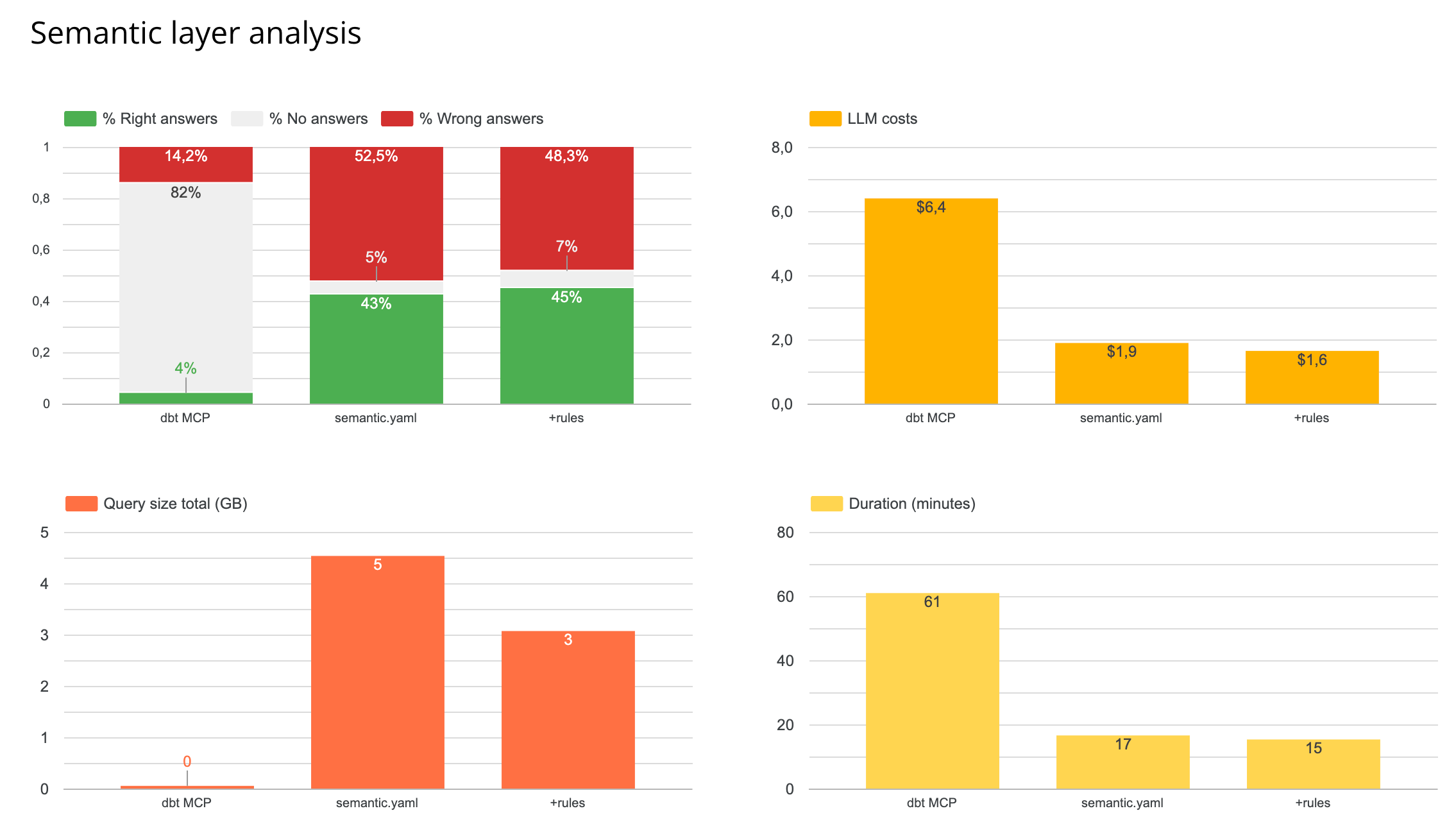
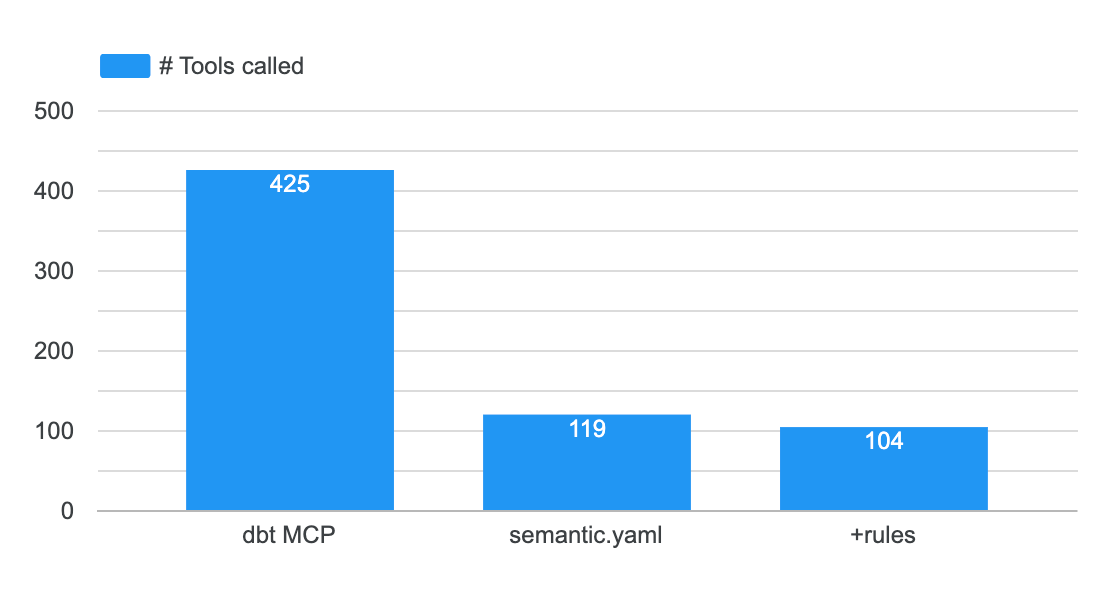
Metrics store: you get less wrong answer - but you get barely any answer at all. It’s way more costly because it triggers 4x more tool calls - and those are very costly in terms of tokens. It’s also 3x slower. (NB: the GB is at 0 because the way of executing SQL queries is different and I didn’t compute it)
semantic.yaml: this brought no additional performance compared to my free form rules.md
In my case, my intuition is that the agent fails on queries that aren’t straightforward metric lookups - anything requiring CTEs, custom logic, or multi-step aggregations. The semantic layer is designed for predefined metrics, not for ad-hoc analytical reasoning.
For small datasets (12 tables in my case), the semantic layer adds complexity without adding value. Whether this changes at scale (hundreds of tables, large teams) is a question worth testing separately.
I understand the semantic layer MCP is good to use for companies who want to optimize for least wrong answers. But it seems there still is a performance issue linked to it that would need to be improved (costs, speed).
🛸 What’s Next (For Me)
I’m continuing this study. Next steps:
Take the best working context for now (tables silver only + schema + sample of data + rules.md)
Understand where and when it fails and how to improve context in consequence
I think the point here is more to understand the topics where your agent fails, and how you can either improve data modeling and/or documentation - rather than thinking about whether and .md file is better than a .yaml.
You can find all results on our #1 context engineering study on nao blog too.
⛹️ Run This Yourself
I don’t want anyone to trust my results.
I hope everyone will run their own tests and share their own results.
In 2 hours, you can setup your test environment + test set with nao open source framework 👉🏻 Github repo: https://github.com/getnao/nao
Here’s how to get started:
Set up your context repo locally with a nao init
Write 10-30 unit tests - question + expected SQL
Configure different context combinations and run them
You can check documentation on how to get started here.
And our context engineering playbook here.
I’m curious to know your findings. What context works best for you? What surprised you? Please share with the community!
Would be really interested to see the rules.md. can you share the file - maybe anonymize some things?
can you share more details about sampling? were you including 10 rows per table?
in my context, i share some helper views that joins tables together and that seems to help the AI understand the relationships
Pretty crazy to me that this is one of the few analytics agent eval "benchmarks" that I can find given how hot the topic is rn